Speedometer 55. Voice coach and navigation guidance.
This page describes the updated voice coach and navigation guidance planned for release in June 2026. Documentation for the older version is available here .
Voice coach and navigation guidance
Voice coach speaks regular track announcements while you record a GPS track. It can announce elapsed time, active track distance, current speed, altitude, and target guidance at time or distance intervals you configure.
Voice and haptic guidance are configured on the same screen. These settings are shared with Navigation settings and are used for navigation hints such as target changes, off-course guidance, and check-ins.
Best for
- keeping your eyes on the road, trail, water, or terrain
- getting periodic track progress without looking at the screen
- hearing target distance and bearing while navigating
- using voice or vibration to stay aware of navigation events
- choosing whether target bearings are spoken as relative corrections or absolute bearings
Open settings
Open MENU, tap the small settings button inside the NEW TRACK menu item, then tap Voice coach & navigation guidance.
The settings screen is split into Coach announcements and Voice and haptic guidance.
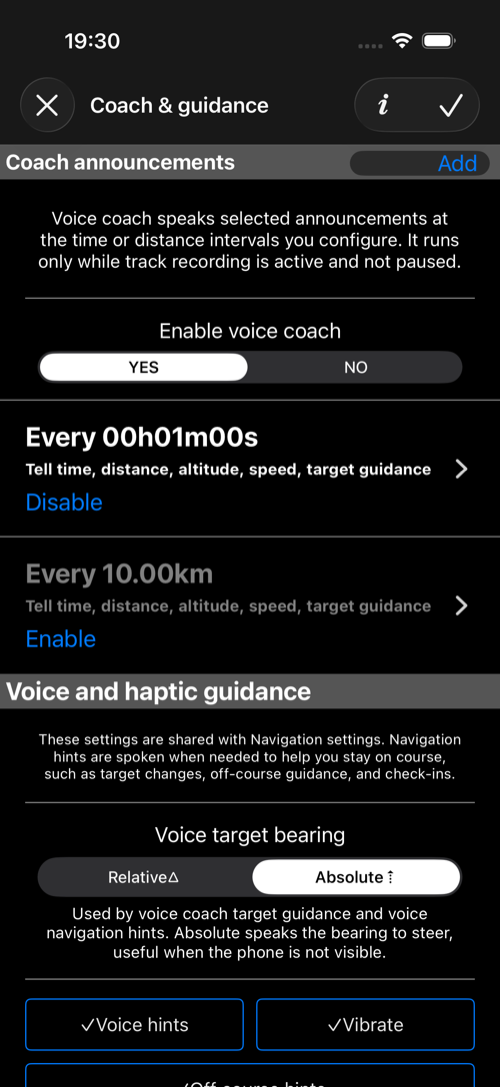
Coach announcements
Turn on Voice coach when you want regular spoken announcements during track recording.
Voice coach runs only while GPS track recording is active and not paused. If track recording is stopped or paused, the coach stays quiet even when it is enabled.
The announcement list contains triggers. A trigger decides when the coach speaks:
- a time trigger speaks every configured time interval
- a distance trigger speaks every configured distance interval
Each trigger can be enabled or disabled independently. This lets you keep several presets saved, such as a short time interval for driving and a longer distance interval for hiking.
Edit announcement trigger
Tap an announcement row to edit its interval and what it says.
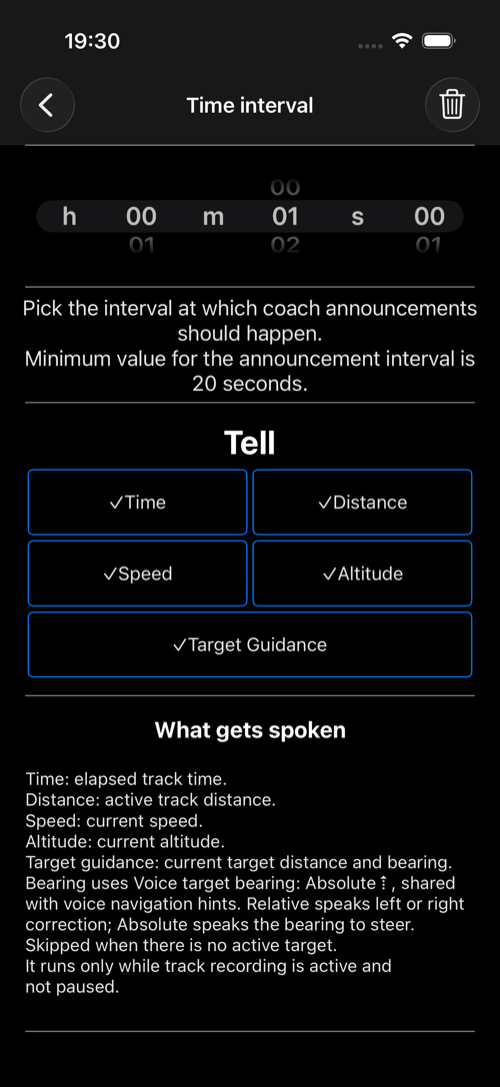
For a time trigger, pick the interval and choose what should be included in the announcement:
Timespeaks elapsed track time.Distancespeaks active track distance.Speedspeaks current speed.Altitudespeaks current altitude.Target Guidancespeaks current target distance and bearing when an active target exists.
The minimum time interval is 20 seconds. If several enabled triggers overlap, the app queues announcements with a reasonable timeout and skips outdated announcements when newer ones arrive.
Target guidance
Target Guidance adds navigation target information to coach announcements. It is skipped when there is no active target.
Target bearing uses the Voice target bearing mode from Voice and haptic guidance:
Relativespeaks a left or right correction from your current direction, such as a bearing correction to the left or right.Absolutespeaks the bearing to steer, useful when the phone is not visible or when you navigate by compass bearing.
The same bearing mode is shared with voice navigation hints.
Voice and haptic guidance
Use this section to control navigation guidance behavior.
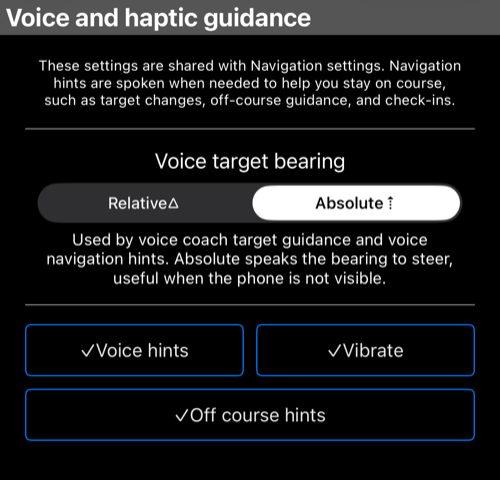
Voice target bearing controls how target bearings are spoken by target guidance and voice navigation hints.
Voice hints enables spoken navigation hints when navigation needs your attention.
Vibrate enables haptic feedback for navigation hints.
Off course hints enables warnings when the app detects that you are off course.
Relative or absolute bearing
Choose Relative when you want instructions based on your current direction, such as a correction to the left or right. This is natural when you can keep the phone oriented with your movement.
Choose Absolute when you want the actual bearing to steer by. This is useful when the phone is in a pocket, mounted away from your line of sight, or when you are following compass bearings.
Good first setup
- Open
Voice coach & navigation guidance. - Turn
Voice coachon. - Keep a time announcement enabled and choose an interval that is not too frequent.
- Enable only the announcement parts you need.
- Turn on
Voice hints,Vibrate, andOff course hintsif you want active navigation guidance. - Choose
AbsoluteforVoice target bearingwhen you want bearings you can follow without looking at the phone.
Privacy and control
Voice coach and navigation guidance are local device features. They speak or vibrate based on your track recording and navigation state; they do not share your location by themselves.
To stop regular announcements, turn Voice coach off or stop GPS track recording. To stop navigation hints, turn off the individual voice, vibration, or off-course options in Voice and haptic guidance.
