Time rules - when the meter charges for time
Every fare has a per-minute rate. This screen decides when that rate applies — which, for a taxi, is the difference between charging for a traffic jam and charging for the whole ride twice over.
Reach it from the HANDLING TIME row in the fare editor .
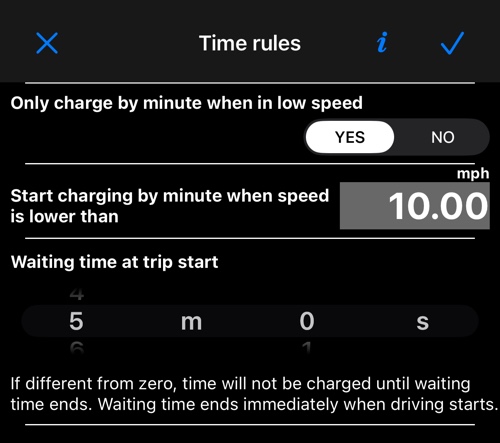
Only charge by minute when in low speed
YES — the classic taximeter behaviour. Below the speed you set, the meter bills time; above it, the meter bills distance. Stationary traffic, a red light and a passenger who asked you to wait outside all become time.
Start charging by minute when speed is lower than is that threshold, in mph or km/h depending on your unit. Ten mph is a common setting.
NO — time is billed continuously, on top of distance, whatever the speed. Fares that are priced as “so much per mile and so much per minute” work this way.
Waiting time at trip start
An allowance, in minutes and seconds, before the time charge begins.
You arrive at the pickup, start the trip, and the app counts the allowance down without touching the meter. When it runs out, time is charged according to the rule above. Driving off ends the allowance immediately, however much of it is left — it is there to cover waiting for the passenger, not to discount the ride.
Leave it at 0m0s and there is no allowance; the fare’s time rules apply from the start. The whole thing is optional.
On Android
The same screen with the same three settings. Nothing to relearn.
More on fares: