Docs
Search
  • Twitter
  • Email
    1. Docs
    2. Speedometer 55
    3. How to switch to MPH or Knots

    How to switch to MPH or Knots

    App Store

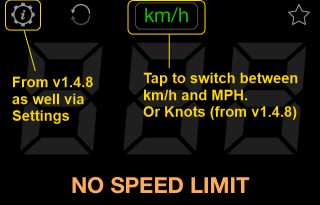
    The app starts by default showing km/h. It is just one tap to switch to MPH and miles/feet. Please use the speed units switch (a “km/h” button in top-center). Every tap on the button switches between km/h->mph->knots and this setting is persisted between the app restarts:


    Links:

    ‣ App shows different speed than my car’s speedometer shows. Why?

    ‣ Show trip timer in the main GPS panel

      Speedometer 55 icon
      Speedometer 55
      Get the mobile app
      Download on the App StoreApp Store