Altitude indicator options
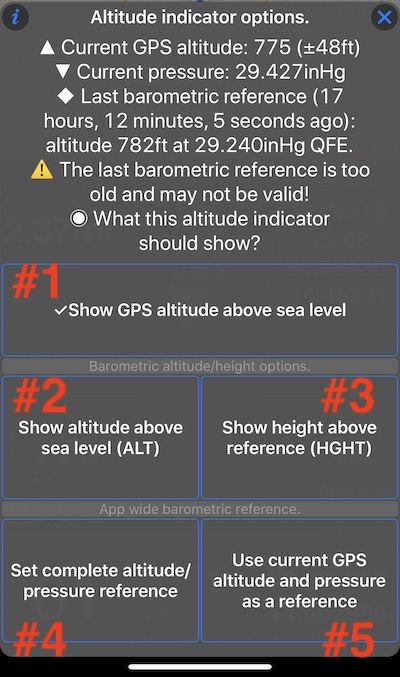
In addition to showing GPS altitude above sea level (#1), from version 1.9.3 you can show altitude (#2) and height (#3) that are based on barometric pressure, given your device has a barometric sensor (all recent devices do).
To show altitude or height based on barometric pressure you need to establish a reference between pressure and altitude.
The altitude indicator menu offers an option to use current GPS altitude and air pressure as a reference (#5), or you can use the “Set complete altitude/pressure reference” option (#4) to set up arbitrary correspondence between altitude and pressure:
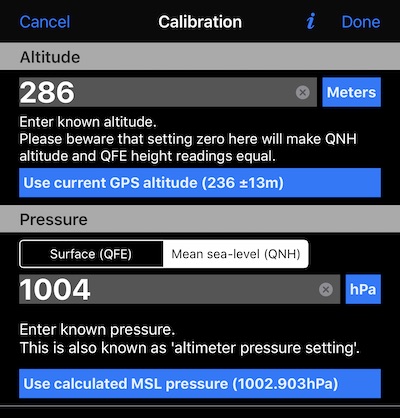
Calibration options include setting altitude and corresponding to it Surface (QFE) or Mean sea-level pressure (QNH).
I hope I studied enough to assign QFE and QNH abbreviations correctly here :). You can always write me to support@blocoware.com and I’ll be happy to fix any injustice to aviation terms and functions.
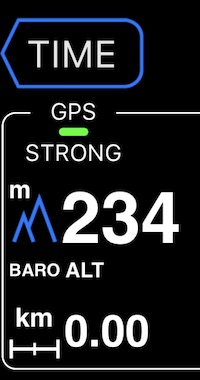
If you pick a barometric source of altitude or height, the altimeter indicator will give you a hint, saying BARO ALT or BARO HGTH: