Спидометр 55. Экспорт путевых точек.
Supported in version 1.7 export formats are:
iGO csv, Navitel csv, Garmin csv
Version 1.8 which is available as a beta adds following formats:
Google Earth KML and KMZ, GPX wpt and rte.
To export, open the list of existing collections:

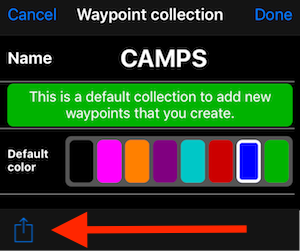
Tap on a settings button on a row with a collection you want to export and use the “action” button:
Choose “Export” action and pick the desired export format:
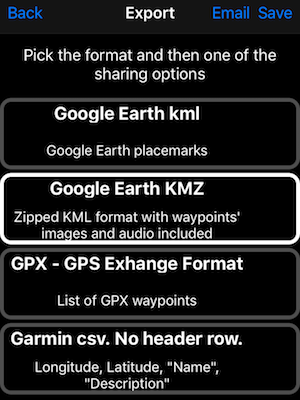
Once you pick the row with the target export format, “Email” and “Save” options will appear. “Email” option will add the export file to the email as an attachment. “Save” provides options to save the export file to iCloud drive, Dropbox, Google drive and any other “drive” for which you might have the corresponding “drive” app installed. If you have airdrop on your Mac enabled, it will appear there as well. Here is an example from my iPhone:

Полное руководство по резервному копированию и передаче данных
Август 2026 — версия 6.3
Изменения версии 6.3 улучшают обмен треками и связанными метками в формате KML/KMZ:
- Экспортируйте записанный трек вместе со связанными метками в один файл KML/KMZ, сохраняя маршрут и важные места вместе.
- Комбинированные файлы можно импортировать только как треки, только как метки или полностью. Связи сохраняются, а линия трека и метки начала/конца не импортируются повторно как дубликаты.
- Время и скорость трека, сводные данные о расстоянии и высоте, снимки карты и точность GPS сохраняются при экспорте и импорте.