Ability to show trip counters and totals when speed is equal to zero or there is no GPS signal.
(FULL version only)
Why to look at 000 (or almost empty screen if you have “show no leading zeroes” option)? There is more interesting info to look at while you wait for a traffic lights or in a jam!
How to switch on.
“Advanced Settings>Zero Speed and NO GPS>Show trip stats”
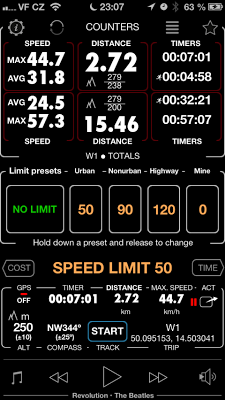
What does it show?
The top row of statistics shows the current counters and below it are trip totals. So I drive to work every day and trip totals will tell me how much did it take overall, like it could be 30 days during last year… But I reset the counters every time I’m heading to work or back so I can see how long and far it was for that specific route I tried today.
What does this running man mean?
This is time when I was actually on the move. So if I spent some time in a jam and some on traffic lights - this timer will not count in that time - I’m not moving. I should stick to the routes with moving time closest to the total time!
