Square tender types
Tender types are the payment methods you tell Square to offer. Getting them wrong is the most common reason Square refuses a payment, and the rule is simple: do not tick anything your Square account is not set up for.
A Czech account, for example, cannot take card payments through Square. Tick Card anyway and Square answers with an error along the lines of “the logged-in account cannot take credit card payments”.
Square’s errors say exactly what is wrong, and the alert offers a Settings button that opens Square settings directly. From there, Tender types.
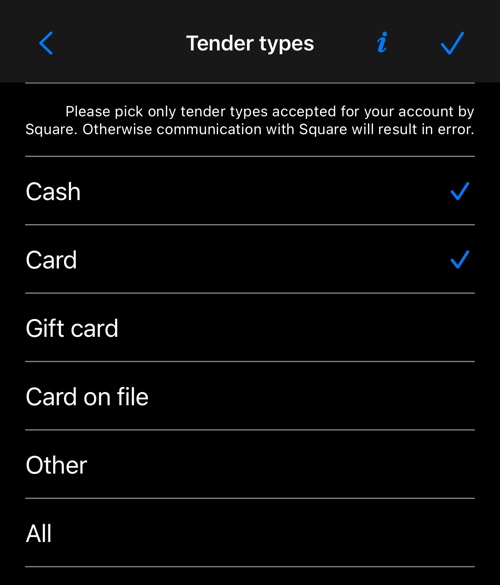
Tick only what applies to you. Whatever you tick here is what Square Point of Sale offers when Taximeter hands it the payment — set up Cash and Other, and those are the two choices the driver sees in Square.

The screen above is Square Point of Sale’s own, and is shown in English in every language.
On Android
Square integration is iOS only.
More on Square:
Square settings ▪︎ Square Point of Sale ▪︎ Fields to send ▪︎ Advanced settings