Fare calculator.
Fare calculator allows you to estimate fares between start and end addresses
MENU > FARE CALCULATOR:
Generating routes and estimates.
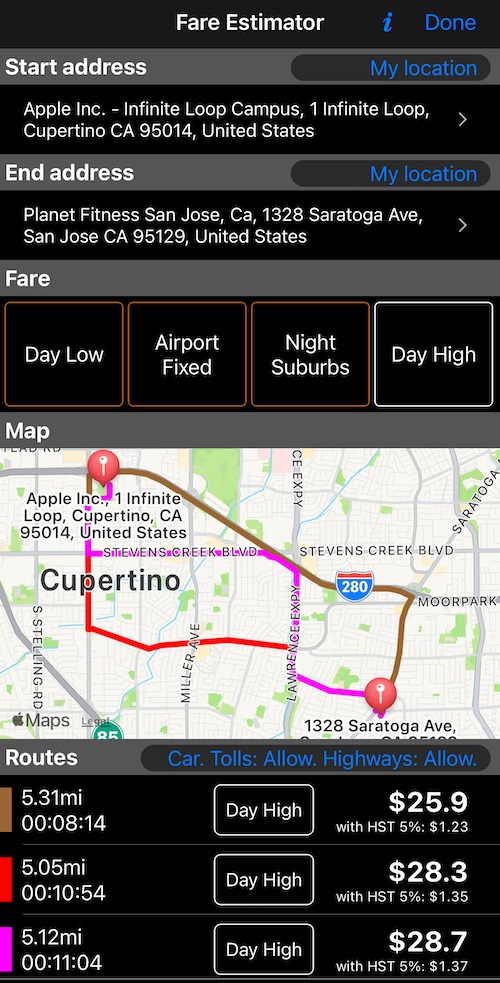
Enter start address (or tap on “My location” to use the current location address). Enter end address.
By default the curren fare is used. If needed, pick a different fare.
When start and end addresses are selected, the map will show the routes. Routes are also shown in the table below the map.
You can switch between the fares to see estimates for each fare, if needed.
Routes table below the map allows you to review distance, duration and estimated fare for each route.
Stops on the way, and coming back.
Not every job is A to B. Since May 2026, on iPhone, iPad and Android, the calculator prices a ride with stops in the middle — a second passenger collected, a wait at a pharmacy, one person dropped before another.
Between the start and end address sits a Stops section. Add stop opens the same address search, complete with its Recent list, and you can add up to five; after that the button reads Max 5 stops. Tap a stop row to Change address, Set dwell time, Move earlier or Move later, or Delete stop.
Once there is at least one stop, a Start button appears on the End address header. It sets the destination back to the start address — one tap for a return route that goes out via the stops and comes home.
Dwell time is what makes the estimate realistic. Ten minutes standing at a pharmacy is ten minutes not earning elsewhere, so each stop carries the number of whole minutes you expect to wait there. In the estimate:
- Distance is the sum of all the legs, priced with the fare’s distance rate exactly as a direct route would be.
- Duration is driving time plus the dwell of every stop, shown separately rather than as one lump.
- Your fare’s Waiting time at trip start doubles as a free waiting allowance, applied once to the combined dwell of all the stops. Whatever is left over is billable at the per-minute rate. If the fare only charges time below a speed threshold , the estimate charges that billable dwell and nothing for driving time.
The breakdown spells this out — stop time, waiting grace, waived, billable — so you can show a customer why a two-stop job costs what it costs.
One thing to know before you set off: a route with stops can only be handed to a navigation app that understands waypoints, which in practice means Google Maps, and Apple Maps on iOS 18.4 or newer. The app filters the list for you and says so if none of them is installed, rather than quietly dropping your stops.
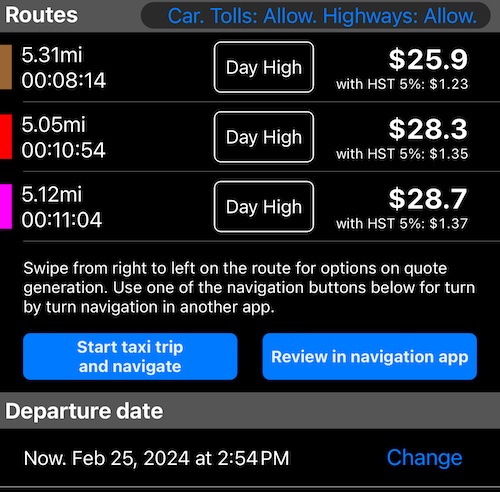
Options for navigating in turn by turn navigation apps.
“Start taxi trip and navigate” option allows you to start a taxi trip with a selected fare in the app and also opens a navigation app with the start and end address for a turn by turn route selection and navigation.
You can also use “Review in navigation app” option to review the available routes in the navigation app of your choice *.
Following navigation apps are supported:
Apple map, Google map, Waze, Sygic, Tom Tom Go, Yandex.Navi, Yandex.Maps, Guru Maps.
*Please note that “Start taxi trip and navigate” only navigates in the selected navigation app from the current location to the end address.
You also have a Departure Date section where you can select a different date and time for a departure. This might influence the routes offered and their duration. The app uses Apple map services to calculate the routes and date/time traffic information is probably subject of availability for different geographic regions. Works well for Prague, Czech Republic, where the app development team is located.
Reviewing and sharing fare quotes.
Fare quotes started as an internal tool for troubleshooting fare estimates, but we’ve promoted them to a full feature — let us know if you find them useful.
For each route, you can swipe from right to left to see fare quote options:
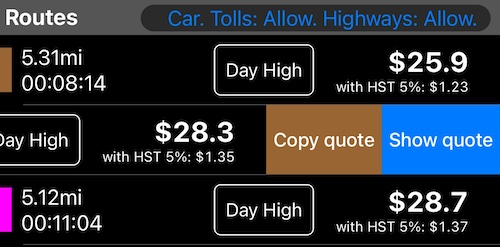
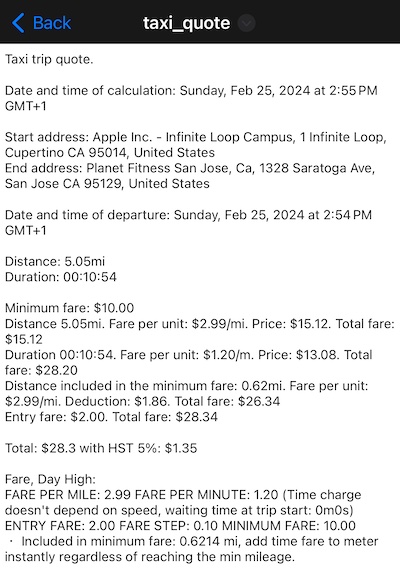
You can either open the quote in a Preview (equivalent of a Preview app on Mac) or just copy the quote to a clipboard.
Might be useful when you need to provide a quote to your customer. Here is how the quote text looks like:
From an estimate to a quote, a trip or a receipt.
Pick a route in the routes table and tap Create quote. The quote is where extras, a note and an adjusted total are added, and it saves itself as you work.
From a finished quote you can start the taxi trip, start it with navigation running alongside, or Save as a trip without driving at all — useful when the price is agreed in advance and the customer wants the receipt now. Saved trips appear in MENU > TRIPS LOG like any other.
Quotes covers the whole flow, including reusing a quote for a repeat customer.
Known limitations.
Please note that everything is an estimate here.
For the intricate fare configurations the actual fare might be different from the estimated one. Use your experience from real trips with your specific fares to add some buffer amounts to the estimates.
If you experience noticable descrepances in the estimates compared to the actual trips, please let us know. Send us a fare quote with your notes to support@blocoware.com.
Recent addresses.
The address search keeps a Recent list of the last 20 addresses you searched for, so a regular pickup point is one tap away.

Extra tips and tricks.
When entering the address and seeing some suggestions already, you can speed up the input by tapping on the shown address so it prepopulates the adress field and then you can just continue with the input. Works well for having street name filled with few taps on a keyboard and then entering the house number after tapping on the street name suggestion.
When entering the address, use voice dictation.
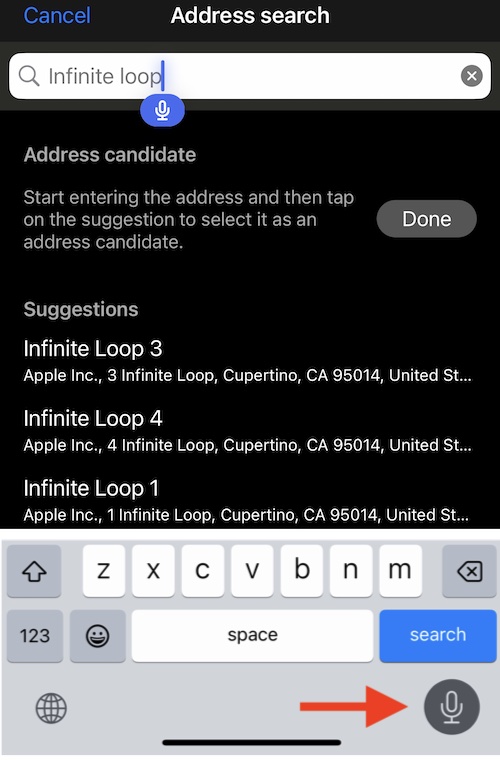
Credit for this tip goes to Izzy (AU)
Notes, wishes, ideas?
Please let us know! We are available at support@blocoware.com
May we ask you to support the app and its further development with your kind review or rating?
Tap here to review or rate the app
Credits.
Huge thanks to Izzy (AU) and Bill (UK) for helping with testing this function in the beta version, suggestions and ideas.
Special thanks to ffddhuunnjikknjj user who left a review in the App Store with suggestion to open calculated routes in others, turn by turn navigation apps, while having a taxi trip started in the taximeter app.