Rally session options — timing, odometer and speed limits
Open Rally settings > Session options. Every option here keeps the old behaviour as its default, so an existing setup does not change until you turn something on.
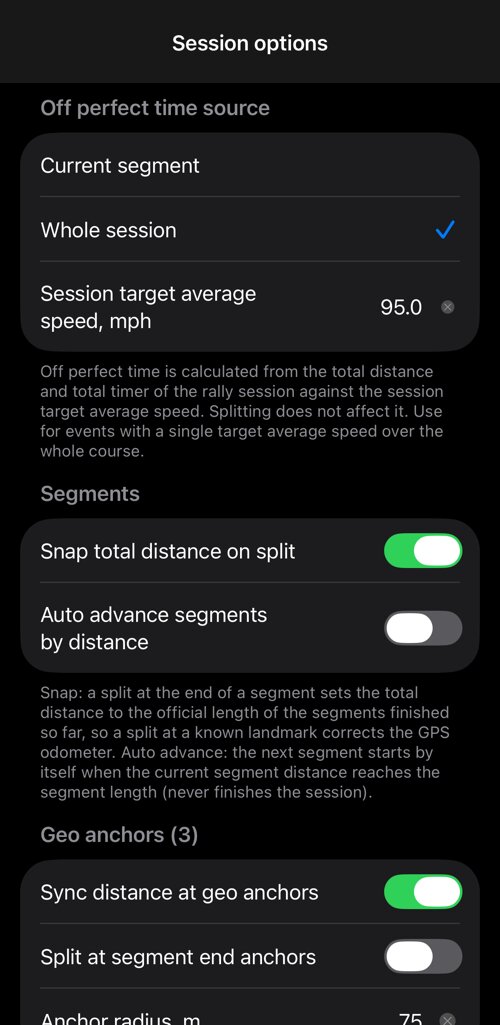
Off perfect time source
- Current segment — off perfect time is measured against the current segment, as before.
- Whole session — it is measured from the total distance and total timer of the session against a single session target average speed. Splitting does not reset it.
Use Whole session for events scored on one target average over the whole course — a single-stage time-speed-distance run, where the variance at the finish is what counts. The rally timers are derived from the clock, so the tenths in the off perfect readout mean what they say.
Scheduled start
Many events start at an assigned time of day. In the rally control panel MENU choose Start new rally session at a time of day, set hours, minutes and seconds, and the session arms itself: the panel counts down and the session starts at exactly that moment, with the timers anchored to it — no reaction time to lose. Cancel the scheduled start while it is armed.
Keep the phone clock on automatic (network) time so it agrees with the event clock.
Segments
- Snap total distance on split — splitting at the end of a segment sets the total distance to the official combined length of the segments finished so far. A split at a landmark you can see becomes a free odometer correction.
- Auto advance segments by distance — the next segment starts by itself when the current segment reaches its length. It never finishes the session. Prefer manual splits when the course has visible landmarks; use auto advance when it does not.
Geo anchors
A geo anchor is a place whose official distance you trust — a checkpoint, a surveyed mile marker.
- Sync distance at geo anchors — passing the place corrects the rally distance to its official value.
- Split at segment end anchors — passing a segment’s end coordinate also splits to the next segment.
- Anchor radius — how close you must pass for it to count. 75 m suits a highway stage.
Anchors come from course notes with a location that has Snap the odometer here on, and from segment end coordinates. This matters over a long stage: GPS path length drifts a few tenths of a percent, which is seconds of error at speed.
Tech and minimum speed
- Tech (maximum) speed with a warning margin — the app warns you before the limit, using the normal speed-limit alert, and restores your own speed limit when the session ends.
- Minimum speed with a grace period — a spoken warning if you stay below it, after the standing start.
Enter the values your class or division requires.
Course-note voice callouts
Spoken callouts are on by default, so a book that carries course notes reads them without you switching anything on. This is where to turn them off, and where to choose how far ahead the next course note is read. The app uses your voice settings and speaks the whole note.
Related:
Rally computer ▪︎ Rally settings ▪︎ Course notes ▪︎ Rally book ▪︎ Off perfect time (TSD) monitor