Rally book — one file for the whole rally
Everything the Rally computer needs for one event lives in a single file: the rally book. Load it once and the app is set up — target average speed, course notes, checkpoints, the route on the map, even the event name and logo on the screen you drive with.
A rally book is a plain JSON file, so it travels by AirDrop, e-mail, iCloud Files or a link, and one navigator can prepare it for the whole team.
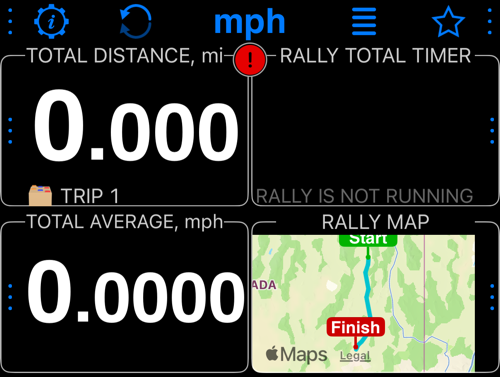
This SSCC book places total distance and the rally timer above total average speed and the route map.
What a rally book carries
- Identity — event title, subtitle, description, logo, organizer credit, website and a disclaimer. Shown when the book is loaded, on the rally control panel before the start, and in My rallies.
- Session settings — target average speed, off perfect time source, tech and minimum speed, odometer behaviour. See Session options .
- Segments — the legs of a timed event, with length, average speed and notes. A book used for navigation needs none, and the screens that configure them appear only when Rally settings' Use this book for is set to A regularity rally. See Rally settings .
- Course notes — the road book: mile markers, instructions and remarks, triggered by distance driven.
- Route — the course line, drawn on the route map and in the map gauge. A route drawn in the route editor also keeps the handles it was drawn from, so the book opens there editable — on your device, in My rallies and in a copy you share.
- Distances in this book — the 2 or 3 decimal places the course was measured to.
- Book language — the language the notes are written in, used for reading them aloud.
- Preferred gauges and colors — an optional gauge arrangement and background colors offered when the book loads.
Load a rally
From the main screen, open MENU > MODES > Rally computer.
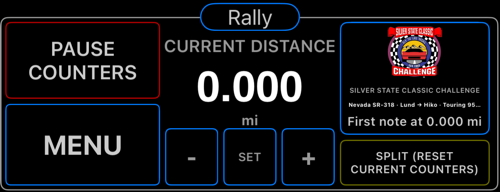
In the Rally control panel, tap the large MENU button at the lower left, shown below, then choose Open rally settings.
In Rally settings, tap ⋯ > Load rally:
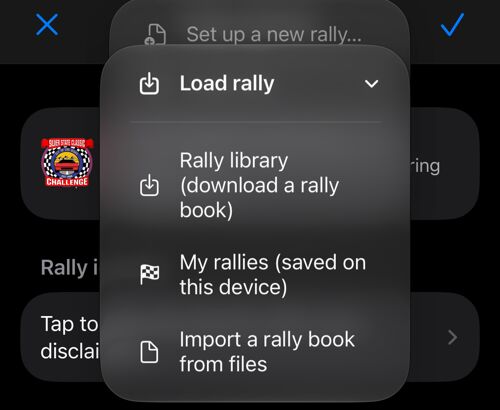
- Rally library (download a rally book) — opens the rally library inside the app. Tap a load link and the book is downloaded, the target average speed you picked is applied, and the app offers to switch to the Rally computer with the book’s units.
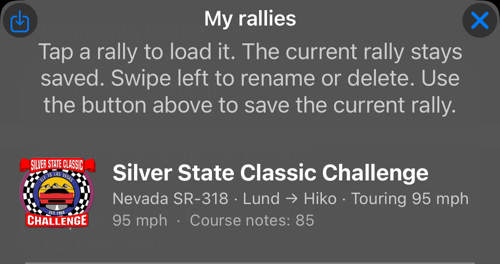
- My rallies (saved on this device) — every rally you load or save is kept here, so switching events never loses the previous one. Tap to load, swipe to rename or delete, and use the button above the list to save the current rally under a name.
- Import a rally book from files — pick a
.jsonrally book from Files or iCloud Drive.
You can also simply open a rally book you received: tap it in Files or in the e-mail and choose Speedometer 55.
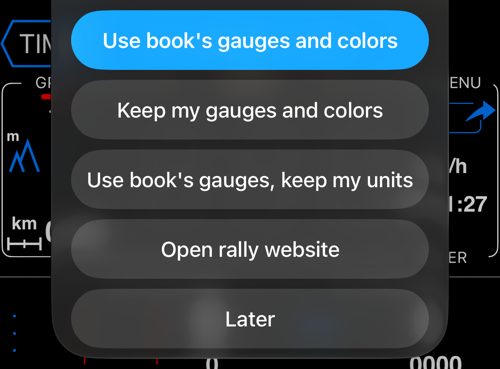
When a book includes a layout, choose Use book’s gauges and colors or Keep my gauges and colors. Both choices use the book’s units. If units differ, Use book’s gauges, keep my units installs the layout while keeping your units. Later leaves the display unchanged; the book is already loaded.
GPS reference points and distance corrections
The SSCC book defines its START course note as a GPS reference point at 0.000 miles. During a running rally, detecting a pass of that point aligns the rally distance with the book’s official distance, preserving any distance already driven beyond the point. The same correction works at later reference points. These points and the settings below are included in the rally book; loading the SSCC book sets them up for you.
To inspect or configure your own points:
- Open Rally settings using the path above, then Tap to manage course notes. Edit START, or tap + to add a note. Set Distance from the rally start to 0 for the start, or to the point’s official cumulative distance in the rally’s units. Enter its instruction or name.
- Under Location (optional), enter accurate Latitude and Longitude, then enable Snap the odometer here. Use Use current location only while at the actual reference point. Keep snapping off for approximate positions: they can still appear on the map. Confirm with ✓ in the note and again in the notes list.
- In Rally settings, open Tap to manage session options. Under Geo anchors, enable Sync distance at geo anchors. Anchor radius controls how close the GPS track must pass to the point; the SSCC book uses 75 m. Confirm changes with ✓.
Voice callout of course notes is on by default, so a loaded book reads its notes aloud without you switching anything on; Session options is where you would turn it off. With it on, the app also says “Rally distance synchronized” for corrections of at least 5 m (about 16 ft) in either direction. Smaller corrections still apply silently, including an already aligned start. This speech threshold is separate from the anchor radius. Save the updated rally book to reuse your configuration.
Course notes and speed warnings take priority. If another rally hint is due at the same moment, this confirmation is skipped. It is also skipped while app audio is busy and is never queued for later. A new spoken hint can interrupt a confirmation that has already begun.
Save the current rally on this device
Arrange the gauges and choose their colors in the Rally computer first. In Rally settings, open ⋯ > Load rally > My rallies (saved on this device), then tap the save icon above the list. Enter a name and tap Save.
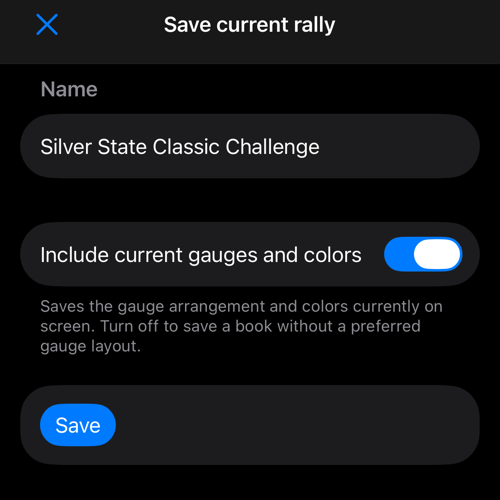
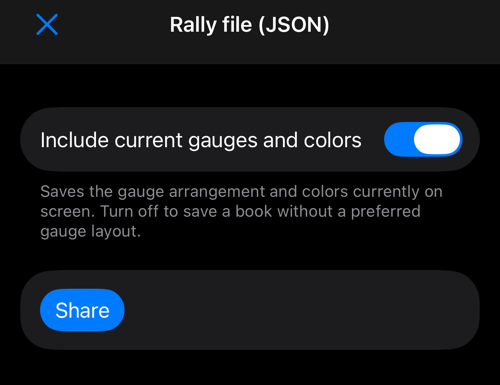
Include current gauges and colors is on by default. It saves the arrangement and background colors currently on screen. Turn it off to save a book without a preferred layout. Saving does not change the working rally or your display. Map type, zoom and day/night style remain device preferences. The same option is offered when saving before Set up a new rally….
The named book now appears in My rallies. Tap it to load it later, or swipe left to rename or delete it.
Share or back up
In the same ⋯ menu, Share or backup offers:
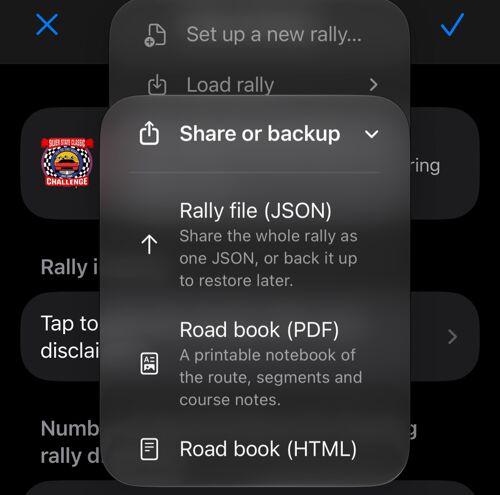
Rally file (JSON) — the whole rally as one file: identity, segments, course notes, route and settings. Save it to Files, send it to the team, or keep it as a backup you can restore later.
Road book (PDF) and Road book (HTML) — a printable notebook of the event: title block, summary, a map of the route, an elevation profile, and the course notes in road-book columns. Useful for the co-driver’s clipboard and for the drivers' meeting.
When the route carries terrain elevation — any book built from a recorded track does, and so does a route drawn in the route editor while the elevation service is reachable — the summary gains an Elevation row for the band the road runs between and a Climb / descent row for what it costs to drive, and the road is drawn from the side beneath the route map. A book with the rules of a timed event also prints its target speed, total distance, ideal time and segment table; a road book with no such rules prints none of them.
To save a reusable copy outside the app, choose Rally file (JSON). Review Include current gauges and colors, tap Share, then choose Save to Files, AirDrop or another destination. The JSON file can be loaded again; PDF and HTML are printable road books.
Three ways to make a book
If the event has no ready-made book to load , make one.
Draw the route on the map. For a road you have not driven yet: in Rally settings, under Route, tap Build the route on the map. You place handles by tapping, tracing the road with a finger, searching or adding waypoints; each stretch follows the road, goes straight or keeps the line you drew. Apply makes it the rally’s route, with terrain for the printed elevation profile, and can add the route’s turns as course notes with tulip diagrams. See Route editor .
Build it from what you already have. In Rally settings, under Route, tap Add waypoints or a track to the rally:
- Waypoint collection → course notes — every waypoint becomes a course note at its distance along the course, with its name as the marker and its note as the instruction, and keeps its position for the map.
- Track → route — a recorded or imported track becomes the rally route. If that track has linked waypoints, the app offers to bring them in as course notes at the same time.
- Route → navigation notes — the turns the rally’s route makes become course notes, with their direction and angle, and the app offers to draw a tulip diagram for each.
Type it in. Add notes by hand in Course notes with +, at their distances from the start.
However the book was made, choose what it is for in Rally settings — Use this book for: Navigation or A regularity rally — and save it to My rallies or share it.
Keep the route with your tracks and on the main map
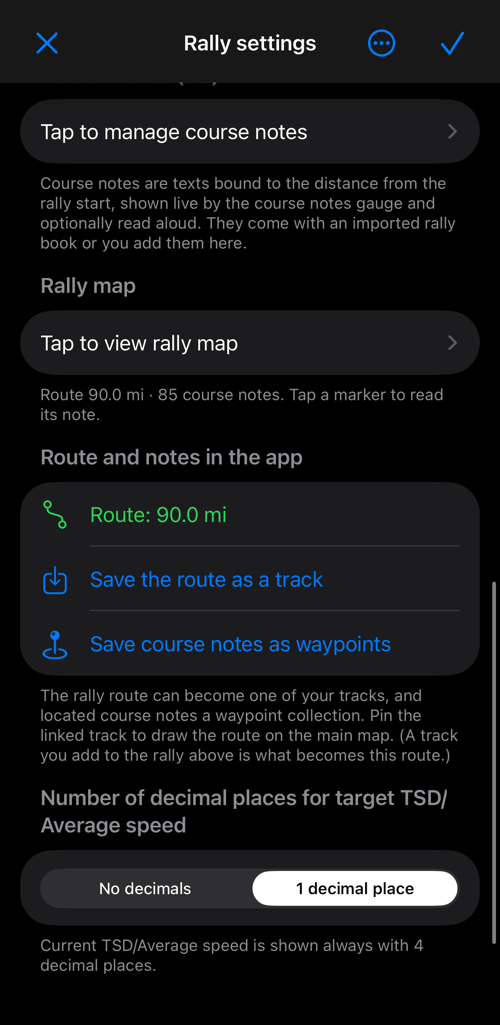
Once the rally has a route, the Route and notes in the app section closes the circle:
- The route is shown with its length, so you can see at a glance that the book carries the course.
- Save the route as a track puts the course into your own tracks; a track you added to the rally is already linked. Applying a route drawn in the route editor unlinks the previous track, because the new route came from no drive.
- Show the track on the main map pins it, so the course line stays on the map outside the Rally computer too.
- Save course notes as waypoints turns the located notes into a waypoint collection.
Related:
Rally computer ▪︎ Rally settings ▪︎ Route editor ▪︎ Course notes ▪︎ Route map ▪︎ Session options ▪︎ Rally library