The GPS camera: photos stamped with location, direction and notes
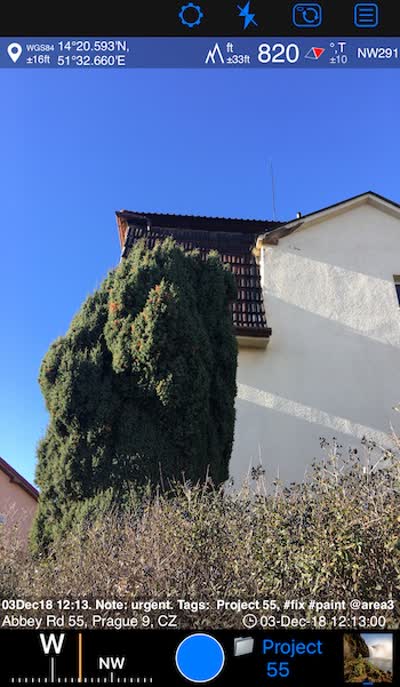
Compass 55 has a camera of its own. It is not there to take better pictures than the built-in Camera app — it is there so a photo carries where it was taken, which way you were facing, how high you were, when it happened and what you wrote about it, and so that photo stays attached to a waypoint you can find again.
Open MENU, then the camera button inside the New waypoint item.
What it puts into a photo
- The stamp: coordinates in your chosen format, altitude, true or magnetic direction, the time, and up to four note fields — title, note, tags/folder and address. What appears and how it looks is yours to set.
- The original stays clean. The stamped image is a second rendering, so the same photo can be re-stamped later with different notes or a different layout.
- Annotation. Draw on the photo by hand or with the drawing tools — arrows, circles, text, dimension lines — before or after saving.
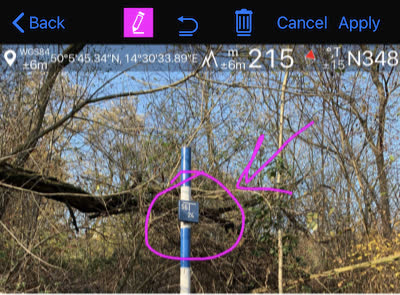
- Notes are searchable. Image notes are stored with the waypoint, shown in the waypoint list, and can be searched and filtered.
- Photos from your library can be imported: the app reads the location out of them, creates waypoints and stamps them like its own.
Where all of that is configured: Camera settings .
The camera screen itself
Everything on the viewfinder has its own page:
- Camera lenses — the automatic camera and a single fixed lens, and where the lens controls live.
- Focus — the AF button and locking focus, far-only autofocus for shooting through glass, a saved focus you can return to, and a dial that places the lens by hand.
- Lenses and zoom — the zoom chip that names the lens actually in use, the lens strip and its stops, AUTO against one fixed lens.
- Shutter timer — 1, 3, 5 or 10 seconds between the shutter and the shot, for a phone on a pole or in a mount.
- Viewfinder controls — gestures, what the AF and microphone buttons do on a tap, a black screen while recording, and the video light.
The same camera records video
Everything about video in Compass 55, in one place:
- Video recording, replay and data overlays — the Action Cam: video that keeps its location and motion data, with the overlays you choose. Includes recording settings and Loop recording, the overlay layout, the saved-video library, replay, making a photo and waypoint from a frame, and export as Original or Stamped.
- Overlay videos for footage from another camera — the data overlays exported on their own, as transparent videos to drop over GoPro, DJI, Insta360 or dashcam footage in iMovie, Final Cut Pro, DaVinci Resolve, Premiere Pro or CapCut.
- Overlay videos from a track — the same gauges from a
track that recorded motion data and no video at all, plus the
Map + pitch & roll + charttrack view and how to delete the recorded data. - Night Vision — a low-light view, with LiDAR depth on supported iPhones, recording into the same video library.
The photo and its waypoint
- The waypoint editor — the photo, the notes and the values that belong to the point.
- Waypoint editor: Advanced — where each value came from, which one to trust, and keeping the attached photo in step field by field.
Related pages
- Camera settings — capture, the stamp and the overlay
- Photos with GPX — matching photos to a track by time
- What’s new in version 5.9 — what the camera screen gained recently
