Compass 55
Essentials
- GPS Tracking ▪︎ Voice coach ▪︎ Channels
- Offline maps ▪︎ Map collections ▪︎ Ground image overlays ▪︎ Blocoware Open Street Map
- Land navigation
- Planimeter
- The GPS camera — photos stamped with location, direction and notes; video recording and data overlays with map, speed and motion; focus you decide, lenses and zoom by name, a shutter timer and viewfinder controls for the trail.
- Controlling the app - buttons and gestures ▪︎ Customizable screen corners
New:
Version 5.8 (August 2026)
Video recording for action and fieldwork . Video recording arrives: action cam on the move, survey camera in the field — with map, speed, and motion overlays you choose. Plus waypoint map snapshots for quick visual context after you leave the place, and waypoints that stay linked to their track. Everything in 5.8 →
Explore the History of Recent Releases for earlier additions.
Soon:
Blocoware Open Street Map — our own map, and the one you can take offline
An OpenStreetMap raster map served by us: streets, tracks, paths and place names worldwide, drawn at retina resolution and turning with your heading. It is also the source you can download region by region for offline use, which OpenStreetMap’s own volunteer tile service does not permit.
Overlay videos from a track — your gauges on footage from any camera
A track can record the vehicle’s motion, and a clap for synchronisation, while recording no video at all. Afterwards the track exports Pitch & Roll, G-Cross, Speed and Map as separate transparent videos — telemetry overlays for footage you filmed on a GoPro, a DJI Osmo, an Insta360, a dashcam or another phone riding the same vehicle, added as layers in iMovie, Final Cut Pro, DaVinci Resolve, Adobe Premiere Pro or CapCut. Tracks with motion data also gain a Map + pitch & roll + chart view. The same export works on video recorded with the Action Cam.
The Action Cam — focus, lenses, a shutter timer, viewfinder controls
The camera screen stops making the decisions for you. Four things, each with its own page:
Focus — lock it, keep it far, save it, or set it by hand. Decide what the camera focuses on instead of leaving it to autofocus: lock the focus where it is, keep autofocus on distant subjects — which helps a windscreen or the rain on it from becoming the subject — save a focus to return to on every later visit, or place the lens by hand on a dial.
Lenses and zoom — AUTO, or one lens by name. Use every lens of a multi-camera iPhone by name: a strip with all the lens stops, a selector for AUTO or one fixed focal length — so the repeated shot goes through the same glass — and a chip that always names the lens actually doing the work.
Shutter timer — 1, 3, 5 or 10 seconds before the shot. Seconds between the tap and the shot, so a phone on a pole or in a mount is standing still again by the time it captures. Remotes and hardware buttons still fire immediately.
Viewfinder controls — gestures, black screen, video light. Set the viewfinder up for the trail and for fieldwork: tap, double-tap and long-press gestures, what the AF and microphone buttons do on a tap, a black screen while recording, the video light, and the lens settings.
Waypoint editor: Advanced — pick the value you trust, or type your own
See where each value came from — the GPS, the terrain, what you typed, the photo itself — and pick the one you trust for altitude, address, heading and course, or set any of them by hand, which the editor could not do before. Then say, field by field, what the attached photo should carry: copy a value either way, or clear one the photo should no longer hold.
Also in public beta (release date TBD):
- Night Vision mode: low-light view with LiDAR Depth on supported iPhones, plus direct recording to the shared video library.
- Pitch & Roll mode: micro panel to improve spatial awareness and safety (off-road limits, motorhome balancing, etc.). Includes customizable alerts for unsafe angles and recovery back to safe ranges.
- Coordinate grid : read MGRS, UTM, or latitude/longitude directly over the map when a shared visual reference matters.
GPS TRACKING
How to retrace the previously recorded track?
Tracks colored by speed or altitude.
Control GPS tracking and waypoint creation with Siri shortcuts
MAP
Coordinate grid helper — read MGRS, UTM, or latitude/longitude directly over the map. Currently in public beta.
Map collections , allowing you to build a custom map setup—from the base map to a configurable set of map and image overlays—tailored to your mission. Switch between map collections with a single tap when your task demands it. From version 5.0.
Avoid internet/data usage with a Blank Map
Overzoom and underzoom handling for offline maps
Import existing mbtiles, Rmaps, sqlitedb maps
Convert your existing map (e.g. GeoTiff or PDF) into a format supported by the app
LAND NAVIGATION
Route navigation with voice guidance
Route editor and GPX route import, from version 1.7
Use average track speed or instantaneous speed for ETE
Show relative or absolute bearing to target (BRG, course to steer) from version 1.8.2
Zone enter/leave alerts for circular and polygonal zones.
IMPORT & EXPORT
Complete backup and data transfer guide - Moving to a new device, backup strategies, and comprehensive import/export guide
Waypoints export to GPX and Google Earth KML/KMZ from version 1.4
Waypoints and tracks import from GPX files from version 1.5
.kml import - tracks and waypoints, from version 1.8.5.
Export of planimeter objects (Routes and Areas)
Replay tracks and show elevation/speed profile in Google Earth on PC/Mac
TOOLS & INSTRUMENTS
Dual Coordinate Monitor for the current location. View and communicate your position in two coordinate formats at once. Supports also OSGB and SK-42.
Barometric vertical speed indicator
GPS camera - to take photos with location, direction, and notes.
Tap on MENU and then on the camera button inside the new waypoint menu item to open the camera screen.
Text-input based Coordinates Converter , supporting also OSGB and SK 42.
UNITS OF MEASUREMENT
Area and length units of measurement (planimeter).
General units of measurement - Metric, Imperial, Nautical.
Distance units of measurement.
Altitude units of measurement.
Automatic switch from small to big units.
TROUBLESHOOTING
- Low GPS accuracy? Let’s fix it!
- Compass works really oddly, stays at North and then jumps to South. Help!
- I’m at sea level and app shows 80ft (around 25 meters) or more. Why?
- Grid shows instead of an offline map, help!
If the above links didn’t help, please use the top-right star button in the app to let us know about the problem and we will surely reply within 24 hours. Our reply rate is 100%. If there is no reply, please check your spam folder.
You can access the app developer (Stan Dvoychenko @Kalimex-Consulting s.r.o) directly via email: support@blocoware.com or phone number +420 724 730 447.
MODES
Tips & Tricks
Distance, heading, and coordinate tools for the “don’t follow me” map mode. From version 1.6.
Customizable button colors from Version 4.1 .
Pro pack upgrade information
Videos
Brief walk through the main features
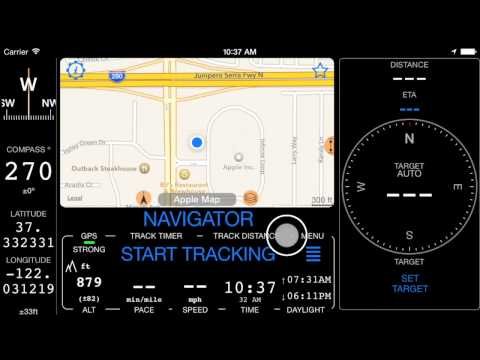
Short video on distance, heading and coordinate tools for the “don’t follow me” map mode
Short video on how route navigation works
Short video on creating a route in the app
1m27s video on two ways of adding waypoints
2m17s video on downloading offline map and finding it later on the main map
A bit longer, narrated video on creating or importing the route
MORE APPS FROM US
GPS Camera 55. Capture photos stamped with location, direction, and notes.
GPS Team 55 - Team tracking and collaboration.

Docs ▪︎ Free in AppStore ▪︎ Public beta version (free) .
Speedometer 55 PRO. Mileage and speed tracker.
Planimeter 55. Measure area, perimeter, distance.
History of Recent Releases
Version 5.7 — Waypoint Map Labels: Adjustable Size, Backgrounds, and Photos
- Waypoint labels, your way
- Waypoint names can now be shown as compact or larger map labels, with either the current filled background or a clean no-background style using the waypoint color for the text.
- Waypoints with attached photos can show a thumbnail right above the name on the map, making photo points easier to recognize without opening the waypoint first.
- To set it up, open Map Settings > Common settings > Waypoint labels. Label size, Photo thumbnail, and Label background are separate visible controls.
Version 5.6 — Track together with Channels, hear clearer navigation guidance, and keep the active track visible while navigating
- Channels replace GPS Beacons with private live links and shared group channels for following each other in the app or on the web.
- Voice Coach and navigation hints now share one setup for regular announcements, on-course guidance, target distance, and relative or absolute bearing.
- Absolute spoken bearing lets you keep the iPhone in your pocket and navigate by voice while holding a magnetic compass.
- Active tracks now draw above pinned tracks, and active track line width is adjustable in Map Settings.
Version 5.5 — Get more natural voice guidance and editable drawing tools for GPS Camera and ground overlays
- Navigation hints, Voice Coach, and waypoint alerts now use the best available voice automatically.
- Numbers, decimals, plurals, time, and duration announcements sound more natural across supported languages.
- GPS Camera and ground-overlay drawings gain text, dimension, and selection tools that remain editable after saving.
- Trip track numbers now match map start/end markers, and pinned tracks can appear on the offline map download screen.
- GPX and trip archive import handling is more reliable.
Version 5.4 — Pin several tracks, reuse pinned-track sets, cache online maps, and manage trip counters faster
- Pinned tracks now support multiple tracks, custom colors and widths, saved sets, and quick reuse.
- Online source map cache improves map browsing and reduces mobile data usage.
- Reworked trip editor streamlines initial mileage setup and ongoing trip counter management.
Version 4.7 — Import waypoints, photos, tracks, and trips directly from common field file formats
- Import KMZ, KML, GPX, CSV, or TXT files directly from the Waypoints screen.
- Import KMZ, KML, GPX, or TRK files from Tracks or Trips.
- The import workflow is available from the More button in the relevant list.
Version 4.6 — Export offline maps or bring map files back from Files without leaving the app
- Export or share offline maps.
- Open or import offline maps directly from disk or Files inside the app.
Version 4.4 — Control tracking and waypoint creation from Siri and Shortcuts
- Siri/Shortcuts integration controls track recording and waypoint creation.
- The update laid groundwork for deeper automation and future Apple Intelligence integration.
Version 4.2 — Paste coordinates and convert OSGB or SK 42 systems without leaving the app
- Adds the text-input based Coordinates Converter .
- Supports OSGB and SK 42 as part of ongoing EPSG coordinate system coverage work.
Version 4.0 — Make offline maps easier to read and start using Bluetooth sensors and automatic check-ins
- Adds overzoom and underzoom handling for offline maps .
- Improves the tracks list.
- Adds the first Bluetooth sensors integration for heart rate, cadence, and speed.
- Adds extra automatic check-in options for land, air, and boat navigation.
