Power & Display: when the screen is allowed to sleep
An iPhone dims and locks itself after a while. On a long job that is exactly wrong: the camera screen goes dark between shots, or the phone locks while it is mounted and recording. This screen decides when the app is allowed to override the system Auto-Lock setting.
Open MENU > SETTINGS, then Power & Display.
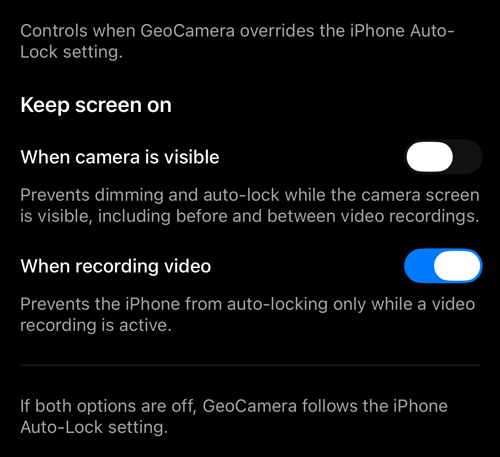
- When camera is visible prevents dimming and auto-lock for as long as the camera screen is on screen — including before and between recordings. This is the one for a phone on a mount or a pole through a whole survey.
- When recording video is narrower: the phone stays awake only while a recording is actually running, and is free to sleep the rest of the time.
If both are off, the app follows the iPhone’s own Auto-Lock setting. That is the default, and it is the kindest to the battery.
Keeping the screen awake costs power, and a bright screen in the sun costs more. On a long day, When recording video alone is usually the better trade: the phone sleeps between clips and stays awake for the part that matters.
Related pages
- Video recording, replay, and data overlays — the recordings this protects
- Viewfinder controls — including a black screen that keeps recording
- Button colours — the other display setting