Teamwork. Voice coach.
Ta strona opisuje starszą implementację trenera głosowego, która staje się nieaktualna wraz z wersją Trener głosowy i wskazówki nawigacji z czerwca 2026 r.
When enabled and configured, the voice coach announces active track distance and duration, as well as current speed and altitude.
In the current version, the voice coach only runs when a GPS track is being recorded. This ensures that the coach provides exact and reliable information, whether the app is running in the foreground or background.
App gives a hint if coach is enabled or disabled (by default). When you tap on a MENU button, the “NOWY ŚLAD” button shows you the current tracking settings, including the voice coach:
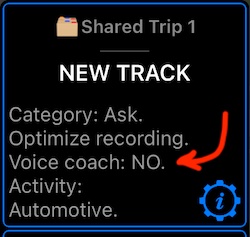
Settings button inside the NOWY ŚLAD button provides the section to configure a voice coach. Here is a voice coach configuration screen:
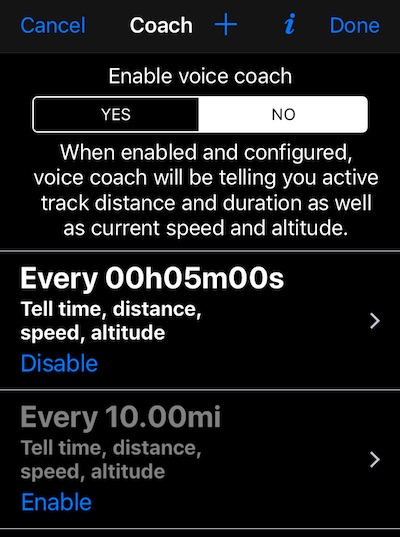
By default, the coach is off and some configuration is pre-populated for you, like an enabled announcement every 5 minutes of tracking and a disabled announcement every 10 miles or kilometers. Until you enable the voice coach, all of this stays mute and inactive.
This setup lets you configure multiple voice coach “triggers” without making them active right away. You can then enable only the triggers you need for a specific situation. Driving and skiing, for example, are very different activities and may need very different trigger sets.
The “+” button on top allows you to add more triggers.
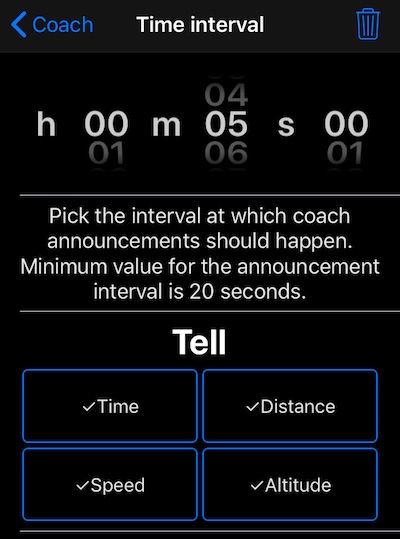
Tapping a row with a trigger lets you configure that trigger’s parameters. Here is a screen for a time trigger:
And for the distance trigger:
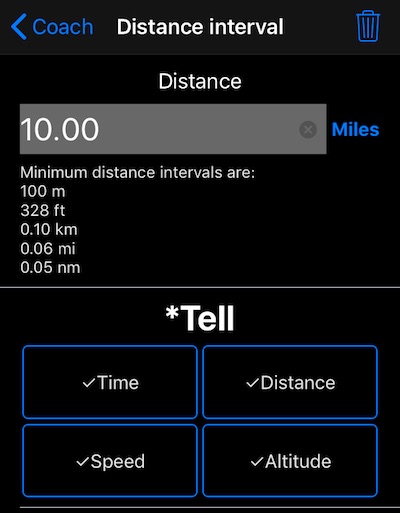
There is no limit on the number of triggers you can have, though the minimum interval is 20 seconds for time and 100 meters (328 feet) for distance.