Taxi trips log - every ride and its receipt
Every taxi trip you run is kept in the trips log. Open it from MENU > Trips log:
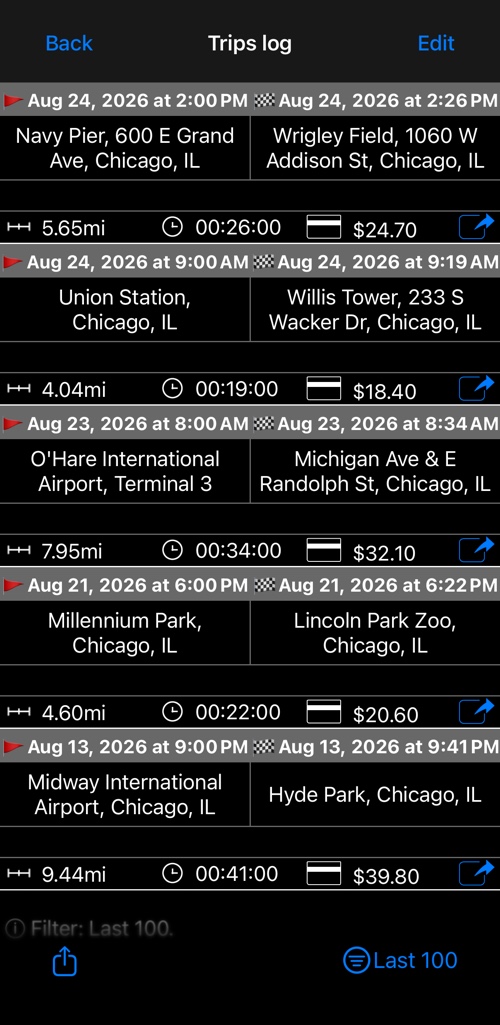
Each row shows when the ride started and ended, the pickup and destination addresses, the distance, the duration and the fare that was charged. The trip in progress is shown at the top in green.
What you can do here
- Reopen the receipt. The button at the right of every row opens that trip’s receipt, so you can review it or send it again — a simple or a detailed one. The total itself can only be adjusted on the trip you have just finished, before you clear it.
- Filter. The button at the bottom right narrows the list to the last 100 trips, or to a month and year of your choosing.
- Export. The share button at the bottom left sends the list by email as a .csv file, ready to open in Numbers or Excel.
- Edit or delete. Use Edit, or swipe a row, to remove a trip you do not want to keep.
Addresses are filled in automatically when automatic address resolution is switched on — see advanced settings .
If you want deleting a trip to require a password, see trip deletion protection .