Taximeter menu - where everything is
Tap the MENU button on the taxi trip panel to open the menu. It is the quickest way to reach everything the app can do:
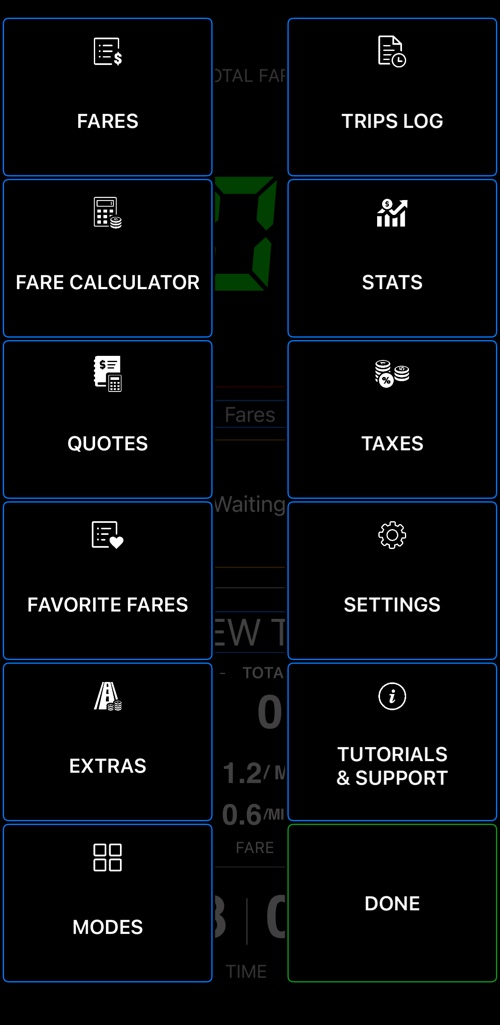
- Fares — create and manage your tariffs, and pick the active one. See the user manual for setting a fare up.
- Fare calculator — estimate a fare between two addresses before the ride starts.
- Quotes — send a customer a written quote for a planned ride.
- Favorite fares — choose which tariffs appear in the one-tap fares switch .
- Extras — manage the surcharges you add to trips: luggage, waiting, cleaning, or a discount with a negative amount.
- Modes — switch the taxi screen between the simple and the detailed layout.
- Trips log — every ride you have taken, with its receipt. More about the trips log .
- Stats — what you earned today, yesterday, this week, this month and this year. More about stats .
- Taxes — set up sales tax for your receipts.
- Settings — units, decimal places and the advanced settings for receipts.
- Tutorials & support — rate the app, or email the developer. We answer every support email within 24 hours.
Done closes the menu and returns you to the meter.