How to Compare Camera Mount Stability
This guide walks you through testing whether a mount change actually improved recording stability, then comparing the results in a shareable before-and-after report. In Speedometer 55, this workflow uses Camera Rig.
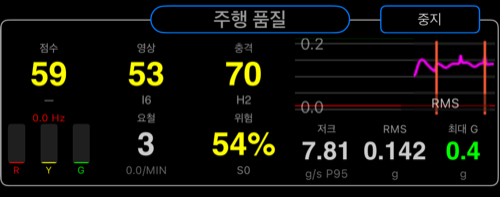
What this tutorial is for
Use this tutorial when you want to answer a practical question such as:
- Is this mount position smoother than the previous one?
- Did tightening or damping the mount actually help?
- Is this route section good enough for usable footage?
- Which setup should I keep after testing two alternatives?
This tutorial follows one rule: change one thing at a time and keep the rest of the run as similar as possible.
Before you start
Set up the test so the comparison will mean something.
- mount the phone firmly
- keep the phone in the same position for all runs unless the phone position itself is the thing you are testing
- choose a route section you can repeat with roughly the same speed and driving style
- change only one variable between runs
Good single-variable examples:
- windshield mount vs dash mount
- mount arm loose vs tightened
- with damping pad vs without damping pad
- same mount, different route surface
Bad comparison examples:
- changing the route and the mount at the same time
- changing speed, route, and phone position all together
- running one session for a short city section and another for a long mixed route
Step 1: Prepare the settings
Open MENU > Modes > Engineering > Camera Rig.
In settings, start with Generic Device unless you already have a custom preset you trust for this exact device and mount style.
For the first useful run, only check these settings:
PresetMax session durationShow saved session details prompt
Use a duration long enough to finish the test section without the session stopping too early.
Keep the saved-session details prompt on. It makes later comparison and reporting much easier because you can label the run while the setup is still fresh.
Do not start by changing thresholds, score weights, or custom labels. First collect one clean baseline.
Step 2: Run the baseline session
The baseline is your reference run before you change anything.
Suggested flow:
- open
Camera Rig - confirm the preset is the one you want
- tap
START - if asked, start a new track or join the current one intentionally
- drive or move through the chosen test section normally
- tap
STOP - save the session
When the saved-session details prompt appears, fill it in clearly.
Recommended fields to use:
Test labelMounting locationOperating conditionNote
Good baseline labels:
Windshield mount baselineDash mount baselineArm loose baselineNo damping pad baseline
Good notes:
Phone in case, medium clamp pressureSame route as comparison runNormal city speed, no intentional harsh inputsBaseline for before and after test
Step 3: Change one thing and run the comparison session
Now change one variable only.
Examples:
- tighten the mount arm
- move the phone lower on the windshield
- add a damping layer
- switch from windshield to dash mount
- test a smoother or rougher route section while keeping the mount unchanged
Then repeat the same run pattern:
- start a new Camera Rig session
- use the same route section if possible
- keep speed and driving style as similar as practical
- stop and save
- label the session clearly
Good comparison labels:
Windshield mount tightenedDash mount with dampingSame mount rougher laneSame route without case
If more than one thing changed, the comparison becomes much weaker. The report may still be readable, but it will not answer a clean question.
Step 4: Read the results in a useful order
Do not start with every metric at once. Read the sessions in this order:
Overall scoreStability scoreImpact score
A practical reading model:
- better
Stability scoreusually means smoother footage and less persistent shake - worse
Impact scoreusually means stronger bumps, sharper hits, or rougher transitions - if
Overall scorechanged butStability scorebarely moved, the difference likely came mostly from impact events
Then look deeper only if needed:
- compare the two channel scores if one axis seems worse than the other
- check event behavior if one run felt rougher than the score alone suggests
- review labels and notes to make sure you are really comparing what you think you are comparing
Step 5: Compare the sessions
Use the saved sessions as a comparison set, not as isolated runs.
A good comparison answers:
- which setup had the better overall result?
- which setup had the better stability score?
- which setup had fewer or smaller impact problems?
- did the change help enough to matter in real use?
Examples:
- if one mount gives clearly better stability with similar impact, it is likely the better recording setup
- if one route has much worse impact but similar stability, the footage may still be usable but harsher over bumps
- if one run is only slightly better but the setup is much more awkward, the tradeoff may not be worth it
This is why clear labels and notes matter. Without them, you can see a score change but not remember what actually changed.
Step 6: Generate a report
Generate a report only after the sessions are labeled properly.
A useful report should make these points obvious:
- what was tested
- what changed between runs
- which run is the baseline
- which run performed better
The report becomes much more useful if:
- both sessions use clear test labels
- the route is the same or intentionally comparable
- only one variable changed
- the note explains the mount or operating condition briefly
Use reports when you want to:
- share the result with a teammate
- justify a mount choice
- document before-and-after testing
- keep a record of what setup actually worked
Step 7: Share the result
Share after the sessions and report are understandable on their own.
Before sharing, check:
- the session names are clear
- the notes explain the setup briefly
- the report reflects the comparison you actually intended
A shared report is most useful when the receiver can understand it without needing your memory of the test day.
Common mistakes
- changing mount and route at the same time
- forgetting to label the baseline clearly
- comparing runs of very different duration or route content
- tuning thresholds before collecting a first clean baseline
- trying to compare sessions when the phone position changed unintentionally between runs
Good first experiment
If you want one reliable first Camera Rig test, do this:
- Run 1: current mount, known route section
- Run 2: same route, mount tightened or damping added
- Compare
Stability scorefirst - Then compare
Impact score - Generate one report and share it
That gives you one clean answer quickly: did the mount change improve the result enough to keep it?
