Blocoware Open Street Map: the map you download for offline use
Blocoware Open Street Map is a map served by us, drawn from OpenStreetMap data: streets, tracks, paths, buildings, water, parks and place names, worldwide, in one consistent style. It is the source for offline maps: you pick a region, download it, and the map is on the phone before you leave the signal behind.
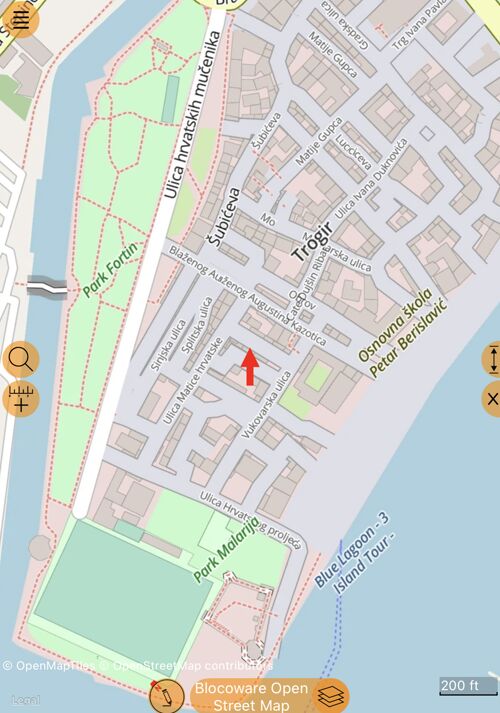
Two things set it apart from the other download sources:
- It is drawn at retina resolution, so labels and thin paths stay sharp instead of turning into a blurry enlargement.
- It is built to be downloaded. The volunteer OpenStreetMap tile service does not permit bulk downloads; this one is made for them, region by region.
It shows detail down to zoom level 17 — building level in a town, and every marked path outside it — and it turns with the map, so a course-up map stays readable.
Where you find it
It is not one of the online maps. Google Map, Apple Map and the blank map stay
the choices for browsing with a signal; this source lives in the offline map
editor. Open the map, tap the layers button, then Offline, and add a map:
Blocoware Open Street Map is the preselected Source. Once a download has
finished, the map appears in the Offline section of the layers list with its
size, and the ⓘ button beside it opens its options.
In TestFlight beta builds the source also appears in the online Maps list, so its style can be checked before a release. That is a beta-only preview, not part of the App Store version.
Attribution and licence
The map carries © OpenMapTiles © OpenStreetMap contributors and a Legal link, in the corner of the map. That line is how OpenStreetMap’s licence is honoured — the data is contributed by people who ask only for the credit — so it stays visible, and it stays on screenshots and shared images too.
Take it offline
Where there is no signal — a valley, a border road, a foreign country without a data plan — the map has to be on the phone before you leave. This source is downloadable region by region.

Open the map layers list, then Offline, and add a map:
- Name it for the place, not for the source — Trogir, Ridge trail.
- Source: Blocoware Open Street Map, already selected.
- Region: the rectangle to download. The picker draws the region on this very map, so you see its style before you download anything.
- Zoom levels: how deep the detail goes. Every extra level roughly quadruples the tiles, so a whole region at level 17 is much larger than the same region at 15.
Start download. The screen shows the tile count and the expected size against the free space you have, and counts the tiles as they arrive.
Some honest limits, so a download does not surprise you:
- 8,000 tiles per download. A bigger area is not refused halfway — the screen tells you before it starts, and you make the region smaller or the maximum zoom lower. Several downloads can cover a large area between them.
- A daily tile allowance applies across downloads. If you reach it, the app says when it resets and the partial map is kept; resume it afterwards.
- Downloads pause and resume. An interruption — the network, the server, the daily limit — keeps everything already saved. Nothing has to start again from zero.
- Offline maps are part of the paid version.
Why not plain OpenStreetMap?
OpenStreetMap’s own volunteer tile service does not permit bulk downloads — it is a service donated for browsing, not for filling phones. So it is no longer offered as a download source, and an older partial download made from it cannot be resumed: cancel it and start a new one from Blocoware Open Street Map.
If something goes wrong
- “The map server could not authenticate this download” — check that the device’s date and time are correct, then resume. A clock that is far off makes every request look invalid.
- “The server temporarily paused this offline download” — resume it later; the partial map is preserved.
- “No usable tiles for this area” — the region may be over open sea, or the service may be briefly unavailable. Nothing is saved for an empty map.
Related pages
- Working with a map — the map screen itself
- Offline maps — everything about offline maps, including the other ways to make one
- Map collections — grouping maps for a trip
- Ground image overlays — your own image over the map
- Coordinate grid — MGRS, UTM or latitude/longitude over any map
- What’s new in version 5.9
